

Flip a toggle on Edge's Send screen, and your payment takes a different path. That toggle turns on Stealth routing, and the route behind it is powered by Houdini.
Edge has already covered why crypto transactions are traceable: every ordinary send on a public chain leaves a record that links the wallet you paid from to the wallet that got paid. Stealth Routing is how you change that path.
Here's what actually happens behind the toggle, what it protects, and when it's worth turning on.
What happens when you turn on Stealth routing
A normal send is one public transaction: your wallet to theirs. Anyone can see both ends.
With Stealth routing on, your payment takes a longer route through Houdini:
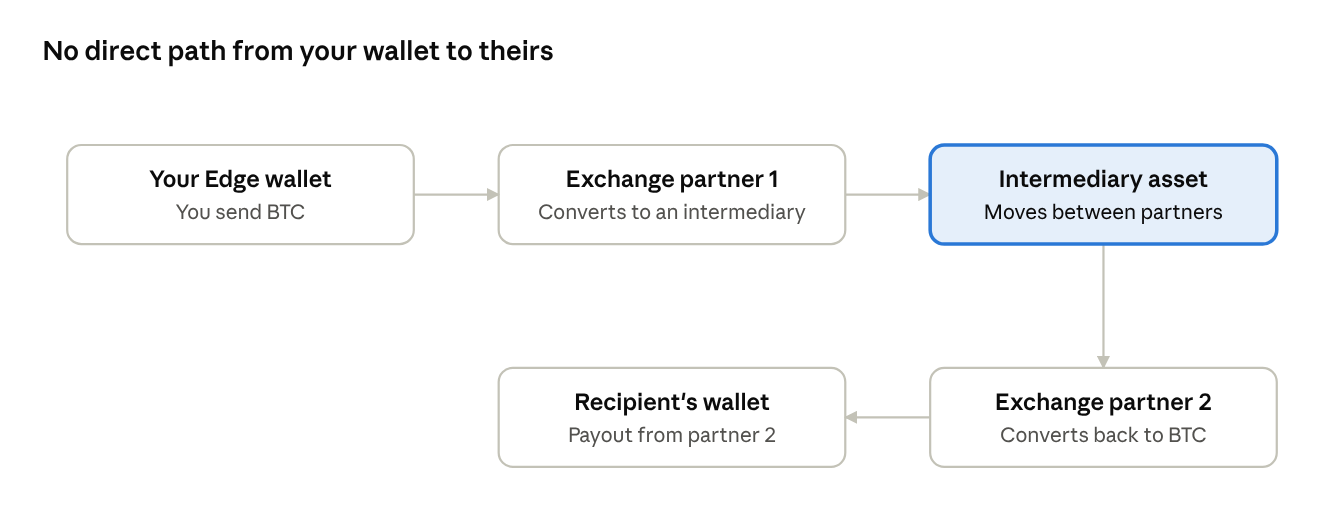
Your BTC goes to the first exchange partner, which converts it into an intermediary asset. That asset moves to a second exchange partner, which converts it back to BTC and pays it out to the recipient.
You send BTC. They receive BTC. But they receive it from the second partner, not straight from your wallet.
Each transfer along the way is still visible onchain. The difference is the exchange activity in the middle. It breaks the continuous public trail that would otherwise connect your wallet to theirs. Simply moving funds from one chain to another wouldn't do the same job.
Houdini never takes custody of your funds at any point in the route.
What Stealth Routing protects, and what it doesn't
The goal is narrow and specific: make your sending and receiving wallets harder to link in public. It doesn't erase transactions, and it doesn't make you anonymous.
What it helps with: someone looking at the recipient's incoming payment has a much less direct path back to your wallet. That's useful when paying a contractor, sending to a friend, or moving funds between wallets you'd rather not have associated in public.
What it can't do:
- Hide amounts and timing. Matching amounts and close timing can still hint at a connection.
- Undo what you've shared. If you tell someone which wallet is yours, no route can take that back.
- Replace good habits. Reusing addresses and funding wallets from each other rebuilds links.
Using Stealth Routing in Edge
In Edge Wallet, Stealth Routing appears on the Send screen for supported payments:
- Same asset: send BTC and have the recipient receive BTC, with Stealth routing turned on.
- With Swap & Send: pay with one asset while the recipient receives another, and turn on Stealth routing where it's supported.
- In the Exchange screen: choosing Houdini as the provider uses Stealth routing automatically, with no separate toggle.
Paying in a different asset doesn't switch on Stealth Routing by itself. It's always your choice, where it's supported.
What to expect
Stealth routing is built for the payments where privacy matters. Here's what to know before you turn it on:
- A small premium. The extra routing adds a modest fee, even when you send and receive the same asset. Your payout is shown before you confirm, so there are no surprises.
- A little more time. Your payment passes through several stages, so it takes longer than a direct send. Worth allowing for if you're paying against a deadline.
- Vetted exchange partners. Houdini never takes custody of your funds. Its vetted exchange partners handle the conversion while the route runs and only process what's needed to complete it.
- Compliance built in. Every transaction runs through AML screening, so you get privacy with the safeguards the industry expects.
For everyday sends where the link doesn't matter, a direct send works fine. For the ones where it does, Stealth routing keeps your wallet history yours.
Public by default. Private by choice.
Send without the trail
Download Edge, open the Send screen and turn on Stealth routing.
Download Edge and try Stealth routing
FAQ
What is Stealth Routing in Edge? It's Edge's privacy option for sends, powered by Houdini. It routes your payment through two exchange partners and an intermediary asset, so the recipient doesn't receive it directly from your wallet.
Where can I use Stealth routing in Edge? On the Send screen, for supported payments. Turn it on when sending the same asset, such as BTC to BTC, or alongside Swap & Send when the recipient receives a different asset. Choosing Houdini in the Exchange screen also uses Stealth routing automatically.
Can I send one coin and have the recipient receive another? Yes, for supported assets, networks and amounts. See Edge's guide to paying in a coin you don't hold. Stealth Routing stays optional when you do.
Why does it cost more and take longer? The route involves extra conversions and transfers, and each stage has to complete before the recipient is paid.
Does Houdini hold my funds? No. Houdini never takes custody.
