
.png)
Private swaps shouldn't mean leaving your wallet. Houdini is built into Nightly, so you can swap across chains without connecting to another app and without leaving a public trail between the wallet you send from and the wallet you receive to.
This is what's actually happening when you hit swap, what stays protected, and how to choose the right swap type for the move you're making.
Why privacy belongs inside a multichain wallet
Nightly is built for people who live across chains. One app holds your assets on Solana, Ethereum, Sui, Aptos, NEAR, Polkadot and dozens more.
That convenience has a catch. Every chain you touch keeps its own permanent public record, and the more chains you use, the more of your activity is on display. A standard cross-chain swap links your sending address on one chain to your receiving address on another. Anyone who connects the two can read your balances, trades and counterparties on both.
Putting privacy inside the wallet changes the default. You don't need to copy addresses into a separate site or connect your wallet to an app you've never used. Privacy becomes an option on the same screen where you already swap.
What happens when you swap privately in Nightly
From your side, a private swap in Nightly takes a few taps: pick what you're sending, what you want to receive, and where it should land. For the exact instructions follow Nightly's step-by-step guide to your first swap in Nightly.
Behind the scenes, Houdini does the heavy lifting:
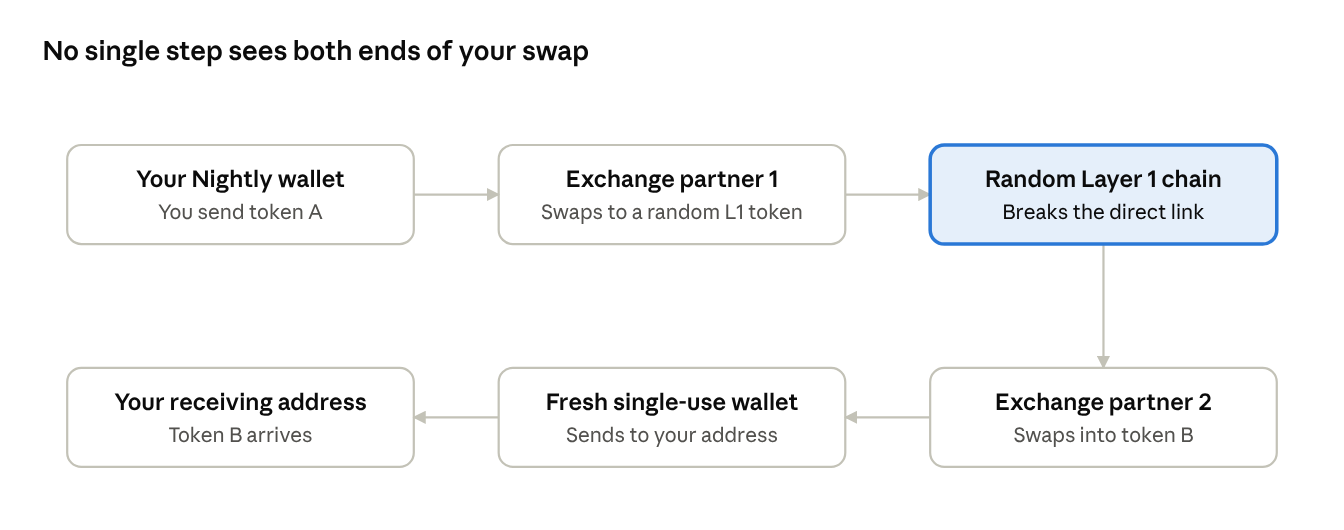
Every private swap routes across two off-chain, non-custodial exchange partners and three separate blockchains. The first partner swaps your token into a randomly chosen Layer 1 asset. The second partner only ever sees that intermediate asset, swaps it into the token you asked for, and delivers it from a fresh, single-use wallet. Neither partner sees both ends of the route.
Houdini never takes custody of your funds, and you never connect your Nightly wallet to an outside app.
What Houdini protects and what stays public
Privacy works best when you know exactly where its edges are. Here's what a private swap from Nightly does and doesn't hide.
The blockchain still records that your Nightly address sent funds, and that your receiving address got them. What it no longer shows is that the two are connected.
Get more out of private swaps in Nightly
A private swap breaks the link. These habits keep it broken.
- Receive into a separate account. Nightly's Multi-Account feature makes it easy to keep a receiving account apart from your main one. Don't fund it directly from your main address afterward, or you'll rebuild the link yourself.
- Keep long-term holdings on Ledger. Nightly supports Ledger, so cold storage and private swaps can live in the same app.
- Don't send it straight back. Moving funds from the receiving account back to your original address reconnects the two in public.
Onchain shouldn't mean on display. Keep the utility. Lose the trail.
Swap privately without leaving Nightly
All chains. One wallet. No public trail. Open Nightly, pick your tokens, and go private.
Download Nightly · Learn more about Houdini Private Swap
FAQ
Is Houdini built into Nightly Wallet? Yes. Houdini is integrated directly into Nightly, so you can make private swaps from inside the wallet.
How do I start a private swap in Nightly? Follow Nightly's walkthrough for each step, from picking tokens to confirming the swap.
Does Houdini hold my funds? No. Houdini is non-custodial. Your funds move through exchange partners and arrive at the address you choose.
Is a private swap the same as a mixer? No. Houdini doesn't pool user funds. Every swap goes through compliance controls, including sanctions screening. Read Houdini's privacy and compliance approach.
